
Lost in Context: Why German Grammar Breaks Your UI (And How to Fix It Before Coding)
Introduction
You have a clean, minimalist English UI. Buttons say “Save,” “Cancel,” “Next.” Everything fits beautifully.
Then you localize into German.
Suddenly, “Save” becomes “Speichern” — fine. But “Please enter your details below” becomes “Bitte geben Sie Ihre Daten unten ein” — 30% longer. Your buttons overflow. Your layout breaks. Your deadline slips.
This isn’t a translation error. It’s a context error.
At WordPar, we see this every week. Developers blame translators. Translators blame missing context. And the client pays for both.
The Real Problem: String Isolation
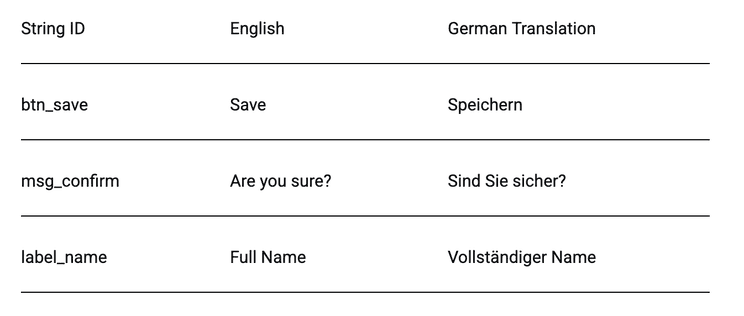
Most localization workflows are still built around isolated strings — spreadsheets or basic CAT tools where a translator sees one sentence at a time, with zero visual reference.
Why German Translation Breaks UI Design
German translation is not a simple word-to-word conversion. It introduces structural and length changes that directly affect UI elements and layouts, especially in digital products and applications.
Common Issues
German text often expands by 20–30%, a challenge known as string expansion, which can disrupt UI components. For example, a simple word like “Settings” becomes “Einstellungen,” instantly increasing character length. German also uses long compound words such as “Datenschutzgrundverordnung,” which can easily overflow containers and break design structures.
Sentence construction is another factor. German grammar often places verbs at the end, making sentences longer and harder to fit into fixed UI spaces. Additionally, the choice between formal and informal tone—“Sie” vs “du”—affects UX consistency and brand communication.
Impact on UI
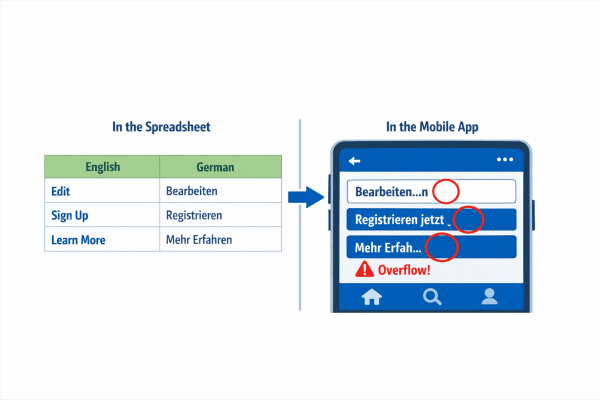
These linguistic differences create real design challenges. Buttons may overflow or break, navigation menus can misalign, and forms often become cluttered. On mobile devices, these issues are amplified, leading to unreadable interfaces and poor usability. Without proper UI localization, even a well-designed app can fail in German-speaking markets.
Case Example (Real, anonymized)
A fintech client localized their dashboard into German using a standard “send us the strings” method.
One button: “View transaction history” German translation: “Transaktionsverlauf anzeigen”
English length: 24 characters German length: 29 characters + different word order.
The button broke. The layout shifted. Users thought the feature was missing.
Cost: 3 developer days + 1 emergency localization audit.
Fix: Context-aware translation with character limits respected.
The Solution: Context-First Localization
At WordPar, we don’t accept isolated strings. We require:
- Screenshots or Figma links – so translators see the actual UI.
- Character limits – for buttons, labels, and menus.
- Placeholder notes – for variables, dates, and currencies.
- Concatenation warnings – so translators know which strings join together.
This is standard in software localization, but many companies skip it to save time. That “saved time” becomes rework.
How WordPar Fixes This Before Coding
We work with your dev team before the first string is extracted.
- Pre-localization audit – Identify risky UI elements (buttons, dropdowns, alerts).
- String expansion estimation – Predict German/Dutch/Finnish length.
- Translator-Developer Bridge – Our project managers mediate context.
Result:
✅ No broken layouts
✅ No emergency rework
✅ Faster time-to-market for global releases
Translation vs Software Localization
Many businesses rely on direct German translation, assuming it is enough to go global. However, translation alone cannot solve UI and usability issues.
Translation focuses on converting text from one language to another while maintaining linguistic accuracy. In contrast, software localization adapts content for real-world usage within digital environments. It considers spacing, layout, context, and cultural nuances to ensure usability across languages.
At WordPar International, localization is approached as a complete process—ensuring your product not only reads correctly but also functions perfectly across global markets.
What Is String Expansion in UI Localization?
String expansion is one of the most critical challenges in app localization and UI localization. It refers to the increase in text length when content is translated from English into languages like German.
For example, “Login” becomes “Anmelden,” and even small increases like this can create major layout issues. Buttons may break, UI elements may overlap, and text can get truncated, reducing clarity and usability.
Ignoring string expansion during development often leads to expensive redesigns and poor user experiences. That’s why it must be considered early in the software localization process.
How to Fix UI Issues with Software Localization
To avoid these challenges, businesses must adopt a structured approach to software localization that integrates both design and language expertise.
Designing flexible UI elements is the first step. Avoid fixed-width containers and allow space for text expansion. Responsive layouts are equally important, ensuring your interface adapts across different screen sizes and devices.
Working with native linguists is essential, as they understand context, tone, and cultural nuances that automated tools often miss. Pseudo-localization is another effective strategy, allowing teams to simulate longer text and identify issues before final implementation.
Finally, context-based translation ensures accuracy by providing translators with UI references, screenshots, and real usage scenarios. This approach bridges the gap between language and design, resulting in smoother user experiences.
Why UI Localization Matters for Business Growth
Localization is not just a technical requirement—it plays a major role in user engagement and business success. Users are far more likely to interact with and trust products that feel native to their language and culture.
Studies show that 50% of users prefer content in their native language, while 72.4% are more likely to make a purchase when content is properly localized. This highlights the direct impact of software localization on conversions and customer retention.
Ignoring localization can lead to lower engagement, higher bounce rates, and a negative brand perception in global markets. On the other hand, investing in UI localization creates a smoother experience that builds trust and drives growth.
Best Practices for German UI Localization
To ensure success in German markets, businesses should follow proven UI localization strategies. Planning for string expansion from the design stage helps prevent layout issues later. Keeping UI text concise and flexible ensures better adaptability across screens.
Avoiding hard-coded layouts allows your interface to adjust dynamically to different languages. Maintaining a consistent tone—whether formal or informal—improves user trust and brand clarity. Most importantly, testing with real users in the target market helps identify and fix usability issues early.
By following these practices, your app localization efforts become more effective, ensuring both functionality and user satisfaction.
Internal Resources
To understand more about linguistic challenges, explore our detailed guide on German grammar challenges in translation. You can also learn more about our Website & App Localization services to see how we help businesses scale globally with precision.
Conclusion
German grammar doesn’t just change words—it changes how your entire interface behaves. Without proper planning, even small translation changes can break layouts and disrupt the user experience.
If your UI isn’t built for localization, layouts will break, messages will lose clarity, and users will lose trust. The solution is not better translation alone—it’s a smarter approach to software localization that considers context, design, and usability.