
The German Grammar Problem Is Actually a UX Design Problem
SUMMARY
When digital products that excel in English break in German with clipped buttons and overflowing menus, the real failure isn’t complex grammar—it is rigid UI design built exclusively for English. German compound words naturally expand text length by 30% to 40%, immediately exposing hardcoded button widths and the flawed assumption that other languages will fit into English dimensions.
The “German Grammar” Problem Is Actually a UX Design Problem
A few years ago, an enterprise client came to us with a critical software failure they couldn't name.
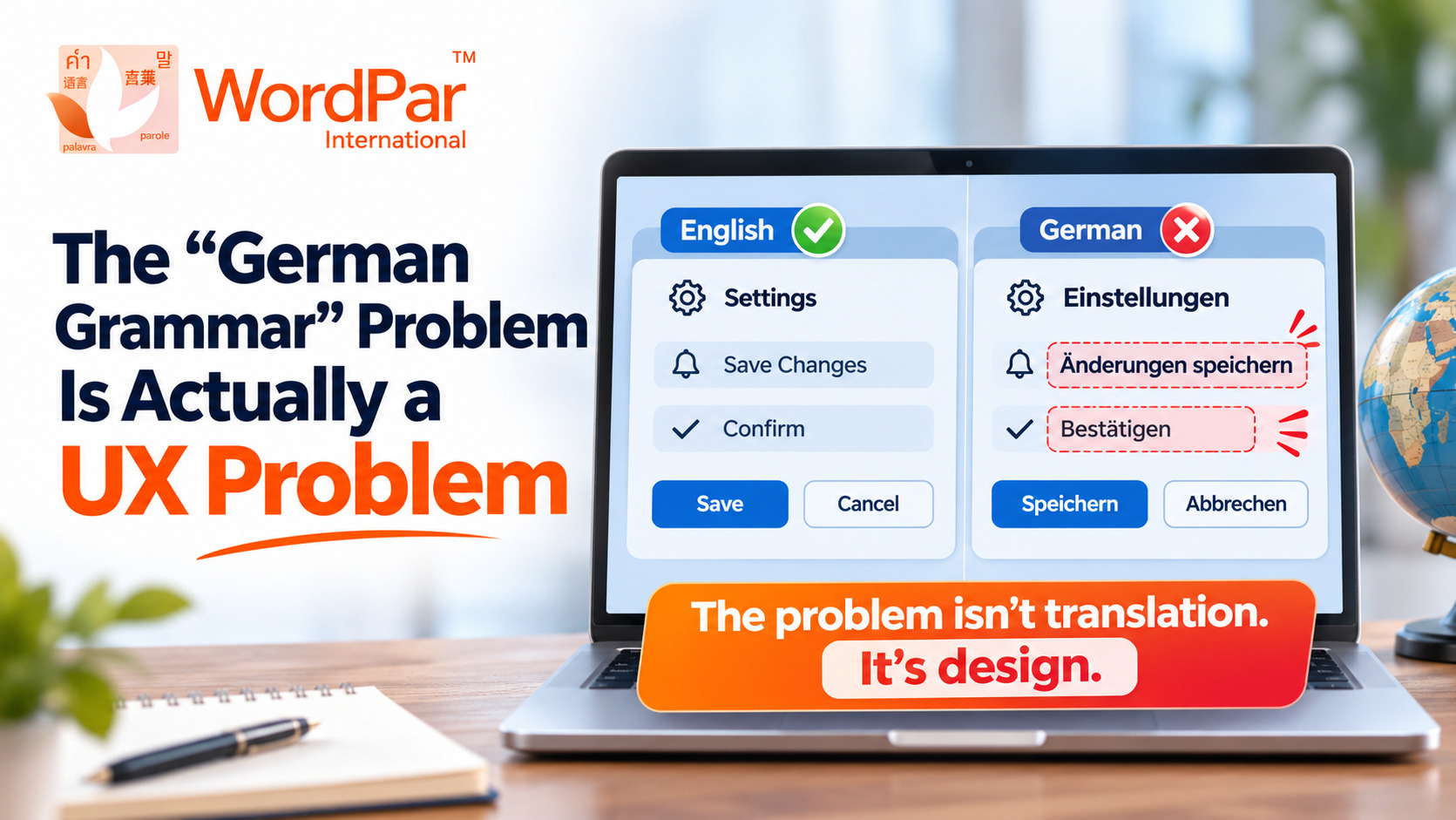
Their digital application functioned seamlessly in English. In German, it fell apart completely. Navigation buttons were truncated mid-word. Dropdown menu items wrapped onto three awkward lines. Modals overflowed, and critical error messages pushed actionable confirmation buttons entirely off-screen. Users in Berlin, Munich, and Frankfurt were complaining, yet no one internally could diagnose the real root cause.
The software developers blamed the translation team for delivering verbose strings. The translators blamed the engineering team for providing rigid, unyielding containers. Everyone concurred that German grammar was simply "too difficult" for modern digital interfaces.
They were all wrong. The breakdown wasn't grammatical. It wasn't linguistic. It was a fundamental UX design failure that translation merely exposed.
Why German Breaks English-Centric Interfaces
German is a compound language characterized by high linguistic specificity. Where English relies on short, modular vocabulary, German frequently concatenates nouns to build exact meanings. The resulting words carry the conceptual weight of an entire English phrase within a single unbroken string.
Real-World Text Expansion Comparison
These terms are not longer because German is verbose; they are longer because German grammar is rigorously precise. When software architects design an interface around concise English strings and only translate afterward, they are attempting to cram a much larger physical object into a fixed box built for something half its size. Inevitably, the user interface breaks.
What This Reveals About Global Product Architecture
The "German grammar dilemma" is a visible symptom of a broader strategic defect: designing exclusively for one language and assuming the rest of the world will fit into the same mold.
When product managers and UI designers build an app or enterprise platform in English, they operate under invisible assumptions. They assume text will wrap predictably. They assume a universal button width will always accommodate verbs like "Go" or "OK." They assume hardcoded layout containers won't encounter dynamic text lengths.
While these assumptions go unnoticed in English, they surface immediately in German—and they escalate into full-scale product breakage in languages like Finnish, Hungarian, Greek, or Thai, where text expansion frequently exceeds 30% to 45% of the original string length.
The UX Lesson: Core Principles of Localization-First Design
The enterprises dominating international markets are not simply those with the best translation memory tools. They are the organizations that adopt localization-first design principles before a single line of frontend code is compiled. This requires four essential engineering disciplines:
1. Dynamic UI Containers Built for Expansion
Never hardcode fixed pixel widths or absolute heights on buttons, tabs, navigation bars, or dialogue cards. Employ flexible layout frameworks (such as CSS Auto Layout, Flexbox, or Grid) capable of expanding dynamically without disrupting page hierarchy or clipping content.
2. In-Context Pre-Launch Testing
Testing must occur in the target locale during staging—not post-deployment. Pseudolocalization and pre-release linguistic validation reveal truncation, awkward word wraps, and visual misalignments long before paying customers encounter them.
3. Absolute Decoupling of Copy from Code
Hardcoded strings in source code turn every routine translation update into a full engineering release cycle. Centralizing UI text into externalized resource bundles (JSON, XLIFF, YAML) transforms website and app localization into an agile, scalable content workflow.
4. Native Bidirectional Layout Architecture
Global products must be built to support Right-to-Left (RTL) scripts, such as Arabic, Hebrew, and Persian. This requires mirroring entire UI flows, form fields, iconography, and navigation paradigms, ensuring equal usability across diverse linguistic cultures.
Comparison: Retrofitted Localization vs. Localization-First UX
| Engineering Dimension | Traditional Retrofit (The English Trap) | WordPar Localization-First UX |
|---|---|---|
| Button & Modal Widths | Static pixel dimensions; overflows & text truncation | Dynamic auto-layout accommodating 40%+ text expansion |
| String Architecture | Hardcoded copy inside components; complex redeploys | Decoupled resource bundles synced via continuous pipelines |
| Quality Assurance | Discovered reactively by disgruntled end-users | Rigorous staging linguistic QA & pseudolocalization |
| Commercial Impact | Costly engineering rework; depressed international adoption | Flawless global user experience; accelerated time-to-market |
← Swipe horizontally to view the full comparison →
The WordPar Approach: Building Products That Scale Worldwide
At WordPar, our global teams see this cycle unfold repeatedly: a company spends significant budget on translation, launches in Germany or Japan, and immediately confronts broken interfaces. The translation itself is grammatically impeccable; the design framework is flawed.
We encourage clients to ask a fundamentally different question. Rather than asking “How do we translate this text?”, progressive leaders ask “How do we architect this product so it can be seamlessly translated?”
- UI/UX Localization Consulting: We partner with product and design teams during Figma wireframing to identify text-expansion risks before code is finalized.
- Full-Stack Software Localization: End-to-end extraction and localization for mobile apps, SaaS dashboards, and enterprise platforms via website and app localization.
- Global E-Learning Adaptation: Ensure LMS platforms and training courses maintain visual harmony across cultures with dedicated e-learning localization.
- In-Context Linguistic QA: Native specialists test actual compiled interfaces to verify that labels, tooltips, and dialogues align seamlessly.
Frequently Asked Questions
Why does text expand when translated from English into German?
German builds specific meaning by compounding words into single complex terms. Because English is naturally compact, German translations typically require 30% to 40% more physical character space to convey the exact same functional meaning.
What is pseudolocalization and why is it important?
Pseudolocalization is a software testing practice that automatically simulates text expansion and accented characters (e.g., generating strings 40% longer with special glyphs) inside UI containers to identify truncation bugs before human translation starts.
Should translators shorten German words to fit fixed buttons?
Arbitrarily shortening German terms or relying on obscure abbreviations confuses native users and reduces interface clarity. The proper engineering solution is to make buttons and UI containers flexible rather than forcing awkward linguistic compromises.
When should localization teams be involved in product design?
Localization specialists should be engaged during the initial wireframing and design system phase. Addressing layout scalability early prevents expensive frontend refactoring after international market launch.
Final Thoughts: Prevention Is Cheaper Than Rework
If your global product breaks in German, resist the temptation to blame the language. Recognize it as an early warning system highlighting rigid, single-language architectural assumptions. When you design for localization from day one, your interface accommodates any language seamlessly—and your global users never encounter a single broken button.
Building for Global Markets? Let’s Design for Scale.
Avoid the expensive trap of retrofitting an English-only product. Partner with WordPar for localization-first design consulting and end-to-end software localization that ensures flawless user experiences worldwide.
Speak with Our Localization Engineering Team →Executive Key Takeaways • Global UX Strategy
- Design, Not Grammar: When translated interfaces overflow or truncate, the root failure lies in rigid layout architecture, not the language.
- Plan for 40% Expansion: Languages like German, Finnish, and Greek require significantly more container width than English.
- Decouple Strings from Code: Externalizing copy into resource bundles prevents costly code refactoring during localization.
- In-Context Validation: Test localized interfaces in real UI environments before release to detect truncation bugs early.
- Localization by Design: Engaging localization experts during wireframing eliminates post-launch engineering rework.
About WordPar International
Enterprise Translation, Software Localization & Cultural Intelligence
WordPar is a global localization leader specializing in website and app localization, document translation, e-learning localization, legal translation, pharmaceutical compliance, subtitling, and AI-powered translation workflows. We unite cutting-edge localization technology with certified native linguists and engineers to deliver robust, culturally resonant digital experiences worldwide.